A quick post on what I have been working on. It is a guitar tuner using the Edison.
This application is written mainly in C (and little of C++). This application is built using the port audio library.
Tuesday, October 13, 2015

Thursday, September 3, 2015
Python on Intel Galileo/Edison - Part6: Light sensor
In this post, we will be using the upm library to interface the Grove Light sensor with the Galileo/Edison using python.
The light sensor is made up of primarily of LDR and opamp:
[caption id="attachment_382" align="aligncenter" width="319"]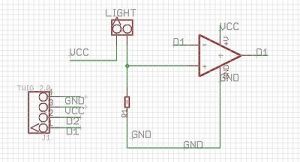 The Grove light sensor (image: seeed studio)[/caption]
"LDR" stands for light dependent resistor (in above schematic, it is marked as "LIGHT") as the name suggests, it is made up of a material that changes it resistance depending on the intensity of the ambient light.
The light sensor is made up of primarily of LDR and opamp:
[caption id="attachment_382" align="aligncenter" width="319"]
 The Grove light sensor (image: seeed studio)[/caption]
"LDR" stands for light dependent resistor (in above schematic, it is marked as "LIGHT") as the name suggests, it is made up of a material that changes it resistance depending on the intensity of the ambient light.
Monday, August 31, 2015
Blockly on and for Edison/Galileo - work in progress
Just a quick post to give you guys a heads up on what I have been working on.
I've been working on bringing Blockly onto Edison/Galileo. The plan is to have blockly server being hosted by Edison from within the blockly interface, one should be able to upload and execute the generated Arduino sketches.
Blockly is visual programming tool using which you can whip out functional code with great ease. It consists of predefined blocks. Combining them you can create executable code targeting a number of platforms. I am basing this on the BlocklyDuino project.
If you are looking for something similar but better, have a look at wyliodrin.
In below video you can see Edison serving up the Blockly. Using the Blockly interface you can see me put together a simple LED (again connected to D5) blinking code.
[embed]https://www.youtube.com/watch?v=DtC7aBmB3nY[/embed]
I've been working on bringing Blockly onto Edison/Galileo. The plan is to have blockly server being hosted by Edison from within the blockly interface, one should be able to upload and execute the generated Arduino sketches.
Blockly is visual programming tool using which you can whip out functional code with great ease. It consists of predefined blocks. Combining them you can create executable code targeting a number of platforms. I am basing this on the BlocklyDuino project.
If you are looking for something similar but better, have a look at wyliodrin.
In below video you can see Edison serving up the Blockly. Using the Blockly interface you can see me put together a simple LED (again connected to D5) blinking code.
[embed]https://www.youtube.com/watch?v=DtC7aBmB3nY[/embed]
Saturday, August 29, 2015
Trying out wordpress
I've decided to give wordpress a shot.
I like the overall theme selection and the way it displays the blogs.
Only gripe I've so far with wordpress is that it loses formatting in visual editing mode but I hope to find a solution for this.
I've already imported all of my posts from this blog I need to fix a few links in there.
You can find my blog posts here: navinbhaskar.wordpress.com
I like the overall theme selection and the way it displays the blogs.
Only gripe I've so far with wordpress is that it loses formatting in visual editing mode but I hope to find a solution for this.
I've already imported all of my posts from this blog I need to fix a few links in there.
You can find my blog posts here: navinbhaskar.wordpress.com
Friday, August 28, 2015
Compiling Arduino sketchs on Galileo/Edison from command line
For some time I've been playing around the idea of compiling and executing Arduino sketches right from the Galileo and Edison. In this post I'll detail out the method that I used to accomplish this task and will also note down the investigation that I had to do in order to do this.
Compiling Arduino sketchs on Galileo/Edison from command line
For some time I've been playing around the idea of compiling and executing Arduino sketches right from the Galileo and Edison. In this post I'll detail out the method that I used to accomplish this task and will also note down the investigation that I had to do in order to do this.
Saturday, August 22, 2015
Cloud 9 IDE on Edison
One of the things I like about the BeagleBone(Black) is that it comes with Cloud 9 IDE off the shelf which means that you do not need to install any kind of software (other than a browser) on your host system to start developing something on the board.
In this post we are going to talk about bringing the cloud 9 IDE experience onto the Edison.
Subscribe to:
Posts (Atom)